Jazz Balance Save Code 2026 – Full Guide, Charges & Unsubscribe Method
Jazz Balance Save Code
Here’s something nobody tells you about the Jazz balance save code: it doesn’t do what most people think it does. Not exactly. And that misunderstanding is why so many users activate it, then complain a week later that their balance still disappeared.
So let’s clear it up properly — what the code actually protects you from, what it can’t fix, and which of the two methods fits your situation. No filler, just the important stuff.
Jazz Balance Save Codes – At a Glance
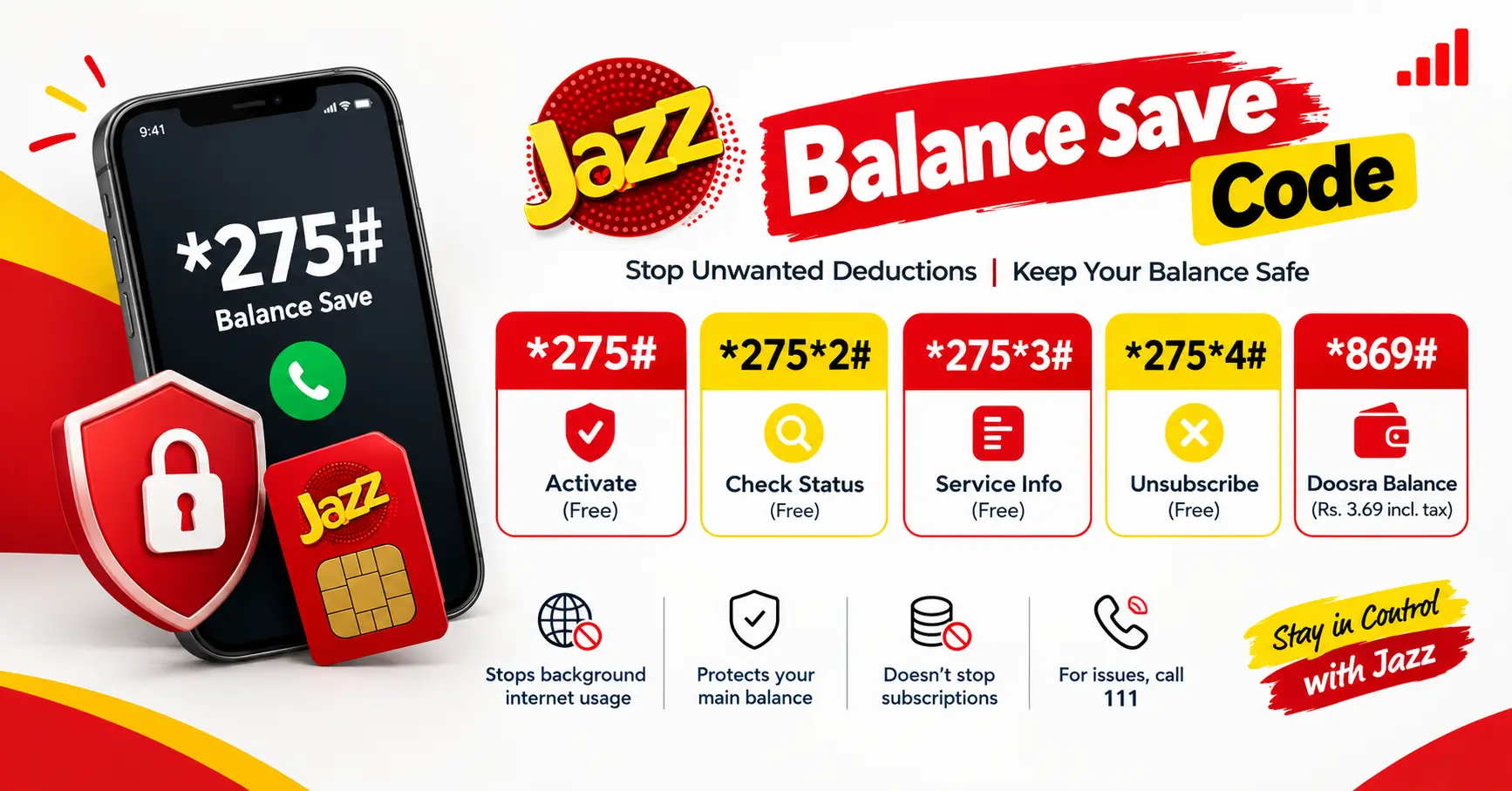
Activate (free): *275#
Check status: *275*2#
Service info: *275*3#
Unsubscribe: *275*4#
Charges: Rs. 0 – free, auto-renews every 30 days
Doosra Balance (separate pocket): *869# – approx. Rs. 3.69 incl. tax
The One Thing Most Guides Get Wrong
Every other website says “dial *275# and your balance is safe.” That’s only half true.
The balance save code locks your balance against one specific thing: background internet usage. When your data bundle expires and some app quietly keeps using mobile data, Jazz normally charges you per MB from your main balance. With *275# active, that door is shut — no bundle, no internet, no deduction.
But here’s what it does NOT stop: unwanted subscriptions, auto-renewing packages, or any service you (or some sneaky webpage) signed up for. Those deductions come from a completely different pipe. If your balance keeps dropping with balance save ON, your problem isn’t the internet — it’s a subscription hiding somewhere. Call 111 and ask them to remove all unwanted value-added services. One call usually ends it.
Think of it like this: balance save is a lock on your front door. It won’t help if the thief is already inside the house.
*275# or *869# – Pick in Ten Seconds
Jazz gives you two tools and most guides blur them together. Here’s the simple way to choose:
Go with *275# if your problem is background internet eating your balance. It’s free, takes ten seconds, and solves the issue for 9 out of 10 people.
Go with *869# (Doosra Balance) if your problem is different — you keep a large balance on your SIM and want part of it completely untouchable, like a separate pocket inside the same SIM. You park money there, nothing can touch it, and you withdraw it back when needed. It costs a small fee (around Rs. 3.69 including tax to subscribe, plus a tiny withdrawal fee), so it only makes sense when you’re protecting a meaningful amount.
You can also use both: *275# for daily protection, *869# as your emergency reserve drawer.
3 Mistakes People Make With Balance Save
Mistake 1: Thinking the phone is broken. With balance save active and no data bundle, your mobile internet simply won’t connect. That’s the service doing its job, not a network fault. The moment you activate any internet bundle, everything works normally again.
Mistake 2: Never checking if it’s actually on. Codes get deactivated during SIM swaps and number portability. Dial 2752# right now and confirm. Takes five seconds.
Mistake 3: Activating it after the damage. The classic story: new SIM, first recharge of Rs. 100, balance gone by evening. Do it the other way round — the moment a new SIM goes into your phone, dial *275# before you even recharge. Ten seconds now saves the “where did my balance go” mystery later.
Jazz Helpline Number – WhatsApp & All Contact Codes
A Quick Test That It’s Working
Want proof instead of promises? Recharge a small amount, leave your mobile data switched on with no bundle active, and don’t touch anything for a day. If the balance sits exactly where it was, the service is doing its job. If it moved, something else is deducting — and that’s your cue to call 111 about subscriptions.
Does It Work on Warid?
Yes. Warid is fully merged into Jazz now, so *275# and *869# behave exactly the same on Warid numbers. One code family, both networks.
Final Words
Look, the Jazz balance save code isn’t some magic trick — it’s just a smart little lock that stops background internet from quietly eating your balance. Dial *275#, check it’s on with 2752#, and forget about it. And if your balance still drops after that, don’t blame the code — hunt down the hidden subscription instead. Ten seconds of setup today saves you from the “where did my money go” headache every month.
FAQs – Jazz Balance Save Code
1. What Is The Jazz Balance Save Code?
The Jazz balance save code is *275#. It helps prevent your prepaid balance from being deducted for mobile internet usage when you don’t have an active data bundle.
2. How Do I Activate Jazz Balance Save?
Dial *275# from your Jazz SIM and follow the on-screen instructions to activate the balance save service.
3. How Can I Check Jazz Balance Save Status?
Dial *275*2# to check whether the Jazz balance save service is active on your number.
4. How Do I Deactivate The Jazz Balance Save Service?
Dial *275*4# from your Jazz SIM and follow the instructions to unsubscribe from the service.
5. Why Is My Jazz Balance Still Deducting After Activating Balance Save?
Balance save mainly protects against certain mobile internet deductions when no data bundle is active. Your balance may still decrease because of auto-renewing packages, paid subscriptions, calls, or SMS. Contact Jazz helpline 111 to investigate unexplained deductions.
6. Is The Jazz Balance Save Code Free?
The *275# balance save service is generally listed as free. However, service terms can change, so confirm the latest details through the SIMOSA app or Jazz customer support before activating it.
Note: Codes and charges can change without notice. Confirm the latest details on Jazz’s official website, the SIMOSA app, or by calling 111 before subscribing.