Jazz World App 2026 – Download, Login & Manage Your Jazz SIM
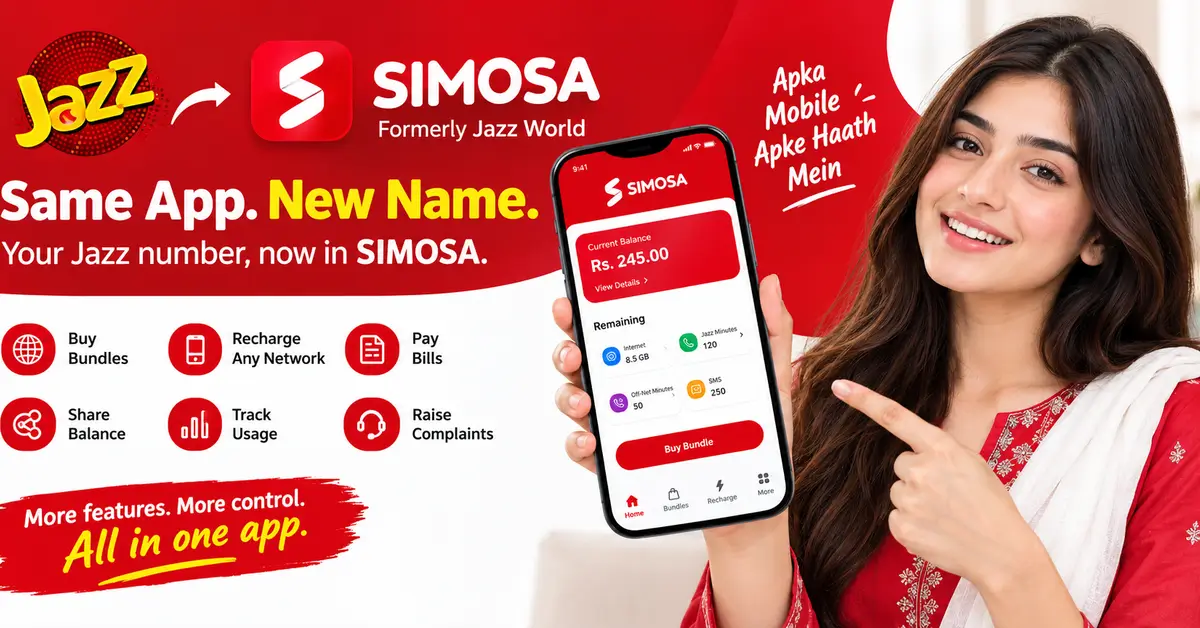
Jazz World App – Now Called SIMOSA
If you searched for the Jazz World app in the Play Store recently and got confused, here is the short version: Jazz renamed it. The app is now called SIMOSA, and Jazz’s own website points you to the SIMOSA download page. Same official self-care app, new name, cleaner look. So if you type “Jazz World” and SIMOSA shows up instead, you are in the right place — do not go downloading some copycat app with a similar name, because fake apps with Jazz-like branding do exist and they are after your number and OTP.
The rename caught a lot of people off guard. For years everyone knew it as Jazz World or My Jazz, so when the icon and name changed, many assumed Jazz had shut the app down. It has not. Your old login still works, your number and history carry over, and everything the old app did, SIMOSA does too — plus a few new extras Jazz added along the way.
What the App Actually Does
So what does this app actually do? In simple words — it puts your entire Jazz number in your pocket. No dialing codes, no calling the helpline and waiting. Jazz’s own SIMOSA page lists the main stuff: buying any Jazz bundle, recharging any network (not just Jazz), paying mobile bills, sharing balance with other Jazz numbers, and seeing exactly where your balance went — what you spent, on what, and when.
And then there is the extra stuff nobody expects. Live cricket and shows on Tamasha. Songs on Bajao. Prayer timings with a tasbih counter and Qibla direction. Tax certificates for your number — yes, really. And if something goes wrong, you raise a complaint right in the app instead of sitting on hold with customer care. But let’s be real — for most of us, it comes down to three things: checking what is left in the bundle, subscribing to a new one in two taps, and recharging without getting off the couch.
Here is the part people miss: the prices and bundles inside the app are always current. Jazz changes this stuff all the time, and the app updates with it. That code you memorized six months ago? It might not do what you think it does anymore.
How to Download and Log In
Getting set up takes about two minutes. Open the Google Play Store on Android or the App Store on iPhone and search for “SIMOSA”. Searching “Jazz World” usually brings it up too, since the listing still carries the old name in its description. Make sure the developer shows up as Jazz / PMCL before you hit install — that is how you know it is the real one.
Once installed, open the app and enter your Jazz mobile number. Jazz will send a one-time verification code by SMS to that number; type it in and you are logged in. Your dashboard then loads with your current balance, active bundles, and remaining MBs, minutes and SMS right on the home screen. If you manage numbers for family members, you can add more than one Jazz number to a single login instead of swapping SIMs around.
Jazz World App (SIMOSA) – Quick Start
- Find it: Search “SIMOSA” or “Jazz World” on Google Play Store or Apple App Store
- Official page: Simosa
- Login: with your Jazz mobile number + SMS verification code
- Cost: free to download
- Check Your Balance and Remaining MBs in the App
This is the thing most people open the app for, and it is genuinely easier than any code. Your current balance sits at the top of the home screen the moment you log in — no dialing, no waiting for a reply SMS. Below that you will see your active bundle with exactly what is left: remaining MBs, remaining Jazz minutes, off-net minutes and SMS, each with its own expiry date.
Tap into the usage or history section and you get the full breakdown — daily data consumption, which bundle gave you what, and when each piece expires. If your MBs ever vanish faster than expected, this screen is where you find out why: it shows background usage per day, so you can tell whether it was YouTube, an update downloading overnight, or a bundle that expired at midnight.
Buy a Bundle or Recharge Without Dial Codes
Subscribing to a bundle in the app is straightforward. Head to the bundles section, pick the category you want — monthly, weekly, internet, call, or social — and you will see every available bundle with its real price, allowances and validity listed plainly. Tap the one you want, confirm, and it activates on your number within seconds. No memorized codes, no “one wrong digit subscribes you to the wrong thing” problem.
Recharging works the same way, and here the app has an edge over easyload shops: you can recharge any network, not just Jazz, and pay by card or bank. It is also where you go when something goes wrong — balance deducted but bundle not activated, recharge failed, wrong bundle applied. Instead of calling 111 and waiting in a queue, you raise it in the app’s complaint section and track the ticket there.
Share Balance and Pay Bills From the App
Balance sharing, which most people do with the 100 code, is a couple of taps in SIMOSA: enter the receiver’s Jazz number, the amount, confirm, and it is done — with the transaction showing in your history so there is no argument later about whether it went through. Bill payments work similarly for postpaid numbers and utilities Jazz supports, all from the same wallet flow as recharges.
The tax certificate section is a quiet lifesaver at filing season: instead of visiting a franchise and asking for your withholding tax record, you download the certificate for your number straight from the app.
Why Use the App Instead of Dial Codes
Honestly, the biggest reason is that you stop having to memorize codes. Nobody remembers whether the status code was 4002# or 4004#, and one wrong digit can subscribe you to the wrong thing. In the app, your remaining MBs, minutes and SMS are just there on the screen, bundles are listed with their actual prices, and subscribing is a tap with a confirmation — no guessing.
It is also the fastest way to fix things. Balance deducted but bundle not activated? Recharge failed? You can raise it in the app instead of calling 111 and waiting in a queue. And because the app always shows Jazz’s current prices and bundles, you never get caught by a code that quietly started doing something different after a price revision.
Jazz Franchise Near Me — Complete Guide
Common Problems and Quick Fixes
Look, apps act up sometimes — no point pretending otherwise. If the SMS code does not show up, do not panic-tap resend five times. Wait a minute, tap it once, and check the SIM is actually in this phone. Sounds obvious, but that is the number one reason codes “never arrive.”
If SIMOSA keeps logging you out on its own, just update the app. Old versions start misbehaving every time Jazz changes something on their backend, and an update sorts it out. And the classic one everyone hits: bundle shows as active, but the internet refuses to work. Airplane mode on, count to ten, airplane mode off. That re-registers your data session and fixes it nine times out of ten.
One last thing — if the app shows a bundle price that looks different from what you remember, believe the app. It pulls live pricing straight from Jazz. Your memory does not. Most blogs do not either.
Final Words
So here is the bottom line — SIMOSA is genuinely the one Jazz app worth the space on your phone. Will it replace your dial codes overnight? Probably not. Old habits die hard, and let’s be honest, *111# is basically in our DNA by now. But give it a week: once you are checking your balance and grabbing bundles in two taps, going back to memorizing codes starts feeling like actual work. Download it, log in once, and stop playing guessing games with your own number.
FAQs
Q: What is the Jazz World app?
A: Jazz World is Jazz’s official self-care app, now renamed to SIMOSA. It lets you check balance, buy bundles, recharge, share balance and pay bills straight from your phone.
Q: Is Jazz World now called SIMOSA?
A: Yes. Jazz renamed the Jazz World app to SIMOSA. It is the same official app with a new name — your old login and number carry over, so do not download any copycat app.
Q: How do I download the Jazz World (SIMOSA) app?
A: Search “SIMOSA” on the Google Play Store or Apple App Store, make sure the developer is Jazz / PMCL, install it, then log in with your Jazz number and the SMS verification code.
Q: How can I check my Jazz balance in the SIMOSA app?
A: Just open the app — your current balance shows at the top of the home screen, along with remaining MBs, minutes and SMS from your active bundle. No code needed.
Q: Can I buy Jazz bundles from the SIMOSA app?
A: Yes. Open the bundles section, pick monthly, weekly, internet, call or social, and tap to subscribe. Prices shown in the app are always Jazz’s current live prices.
Q: Why is my SIMOSA app not working or logging me out?
A: Update the app to the latest version first — old versions break whenever Jazz changes something on their end. If the login code does not arrive, wait a minute, tap resend once, and make sure the SIM is in the same phone.